Your event visuals play a big part in creating atmosphere on the night. Our DJ booth features landscape screens, which can display photos and videos throughout your event as a slideshow. To make sure everything looks sharp, professional, and fills the screen properly, please follow the guidance below when sending your media.
Why Image Format Matters
The DJ booth screens are landscape, just like a widescreen TV. Images that are prepared correctly will fill the screen edge-to-edge, look crisp, and blend seamlessly into the setup. Images that aren’t formatted well can appear smaller, cropped awkwardly, or surrounded by black space, which reduces the overall impact.
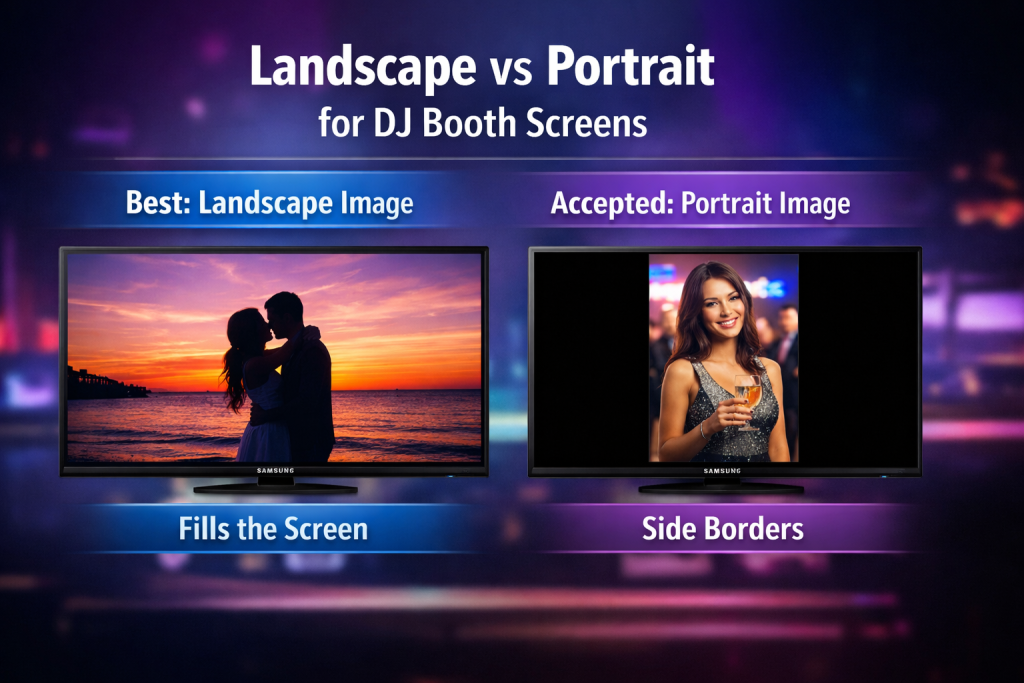
Landscape Images Work Best
Landscape images always give the best results because they naturally match the shape of the screens. They fill the space properly and look clean and professional during the slideshow.
Portrait images are also accepted and will still display correctly, but they won’t fill the screen in the same way. This means you may see space either side of the image. For the strongest visual effect, landscape images are strongly recommended wherever possible.
Please Avoid Screenshots Where Possible
Photos taken directly from a camera or phone work best. Screenshots often include unwanted elements such as black borders, blank space, or toolbars from the top of the phone screen.
If you do need to send screenshots, please crop them carefully. Remove any black or blank areas and make sure the image fills the frame as much as possible. Toolbars, battery icons, and notification bars should always be removed before sending.
You Can Send As Many Images as You Like
There is no limit on the number of images you can submit. Some clients send just a handful, while others send large collections. The most images we’ve ever received for a single event was over 200.
Because the screens run on a continuous slideshow, the more images you send, the better the variety on the night. Using only two or three images can become repetitive, whereas a larger selection keeps the visuals fresh and engaging throughout the event.
Videos Are Welcome Too
Videos can also be displayed on the DJ booth screens and work brilliantly alongside images. Short clips are ideal, but longer videos are also accepted. If you’re unsure whether a video is suitable, feel free to send it anyway and we’ll take care of the rest.
How to Send Your Images and Videos
You can send your media in whichever way is easiest for you. Images and videos can be sent via Facebook Messenger, WhatsApp on 07464 483014, email to info@heardthebeat.co.uk, or by sharing a WeTransfer link using https://wetransfer.com/.
Image Content Guidelines
All images and videos must be appropriate for a public event setting. Please avoid anything that could be considered offensive or unsuitable for guests of all ages. If anything sent isn’t appropriate for display, it
simply won’t be used.
Please Send Images at Least One Week Before the Event
Where possible, we kindly ask that all images and videos are sent at least one week before your event date. This gives us enough time to download, check, and prepare everything so it runs smoothly on the night.
Sending your media in advance allows us to ensure the files display correctly on the DJ booth screens, avoid last-minute issues, and make sure the slideshow flows nicely throughout the event. While we understand that some images may come in closer to the date, earlier submissions always lead to the best results and a stress-free setup on the day.
What Happens to Your Images After the Event
All media provided for the DJ booth screens is deleted after your event. Your images and videos are only used for your booking and are not stored or reused once the event has finished.